
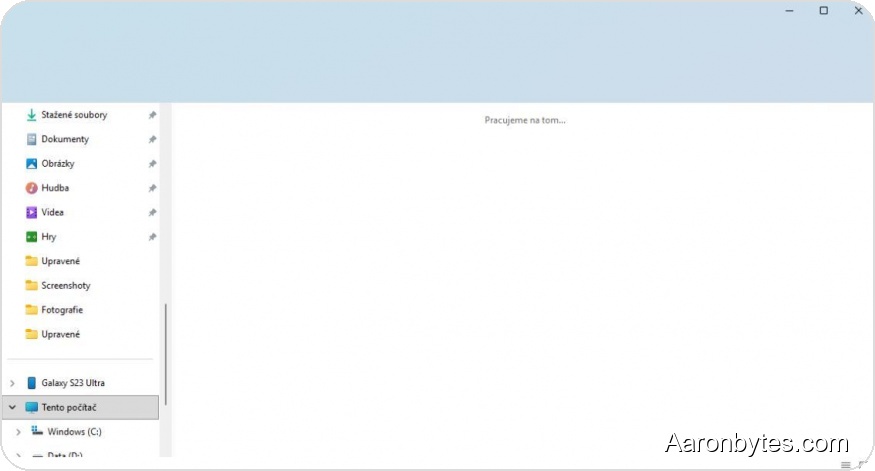
Windows 11 has been through four years of steady evolution, and one of the most noticeable pain points has been File Explorer. Even on fast PCs with high-performance SSDs, users still sometimes open Explorer and see a blank white area before folders and files appear, followed by a “Working on it” message. Microsoft says it is addressing that exact issue.
In the latest Windows 11 test builds for Insiders on the Dev and Beta channels, Microsoft is trialing a background preloading feature for File Explorer. The company says typical users should not notice any behavioral changes during normal use, but the system file browser should launch significantly faster.
The preloading option will be user-controllable from within Explorer settings, so you can toggle it on or off. Microsoft expects it to be enabled by default.
Earlier this year, Microsoft implemented a similar optimization for Office apps, which now start up faster than before.
Slimmer context menus with a Manage file subsection
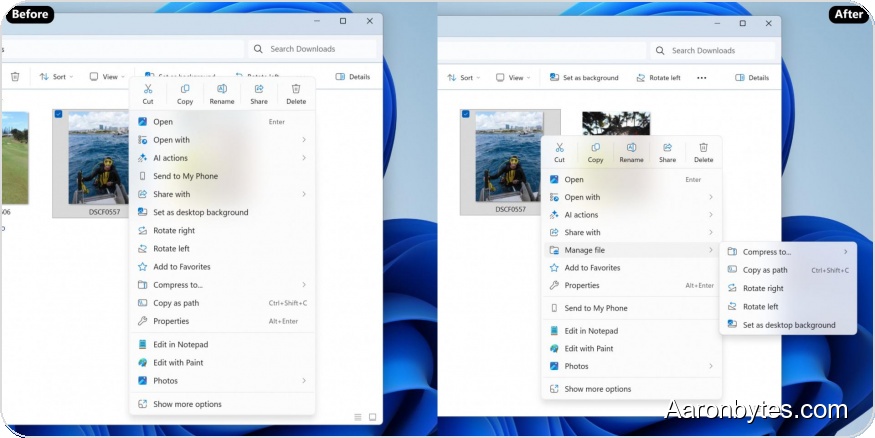
The other change under test targets File Explorer’s context menus. The menu that appears after right-clicking a file or folder has become unwieldy, so Microsoft is working to simplify it.
Some items from the main menu will be relocated into a Manage file subsection. For images, for example, those relocated options could include compress, copy path, and rotate. Cloud-file related entries will also move into their own expanded submenu.
When to expect the changes?
Both File Explorer features are currently in testing. Microsoft plans to roll them out in the stable release early next year.